
How to Set up and Manage Time-off Policies
How to Manage Employee Benefits
Step 1: To upload or update an employee’s Rent Relief information,from the People App, open the employee’s profile to access and navigate to the Rent and Relief Allowance section. This section is used to record housing-related information that may be required for tax relief calculations documentation.
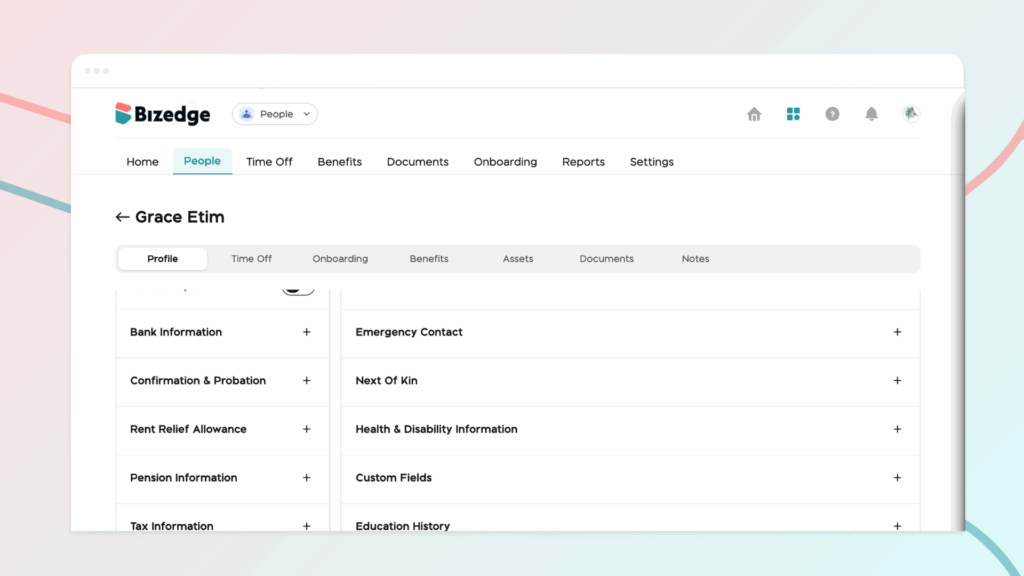
Step 2: In this section, begin by entering or updating the Total Annual Rent Paid. Providing accurate information here helps ensure that any applicable rent relief or housing-related benefits are correctly calculated.
Step 3:Then enter the Effective Start Date of Rent. This represents the date when the employee’s current rent payment arrangement began. Recording the correct start date helps the system determine the valid period for the rent information and ensures proper documentation for compliance or benefit tracking.
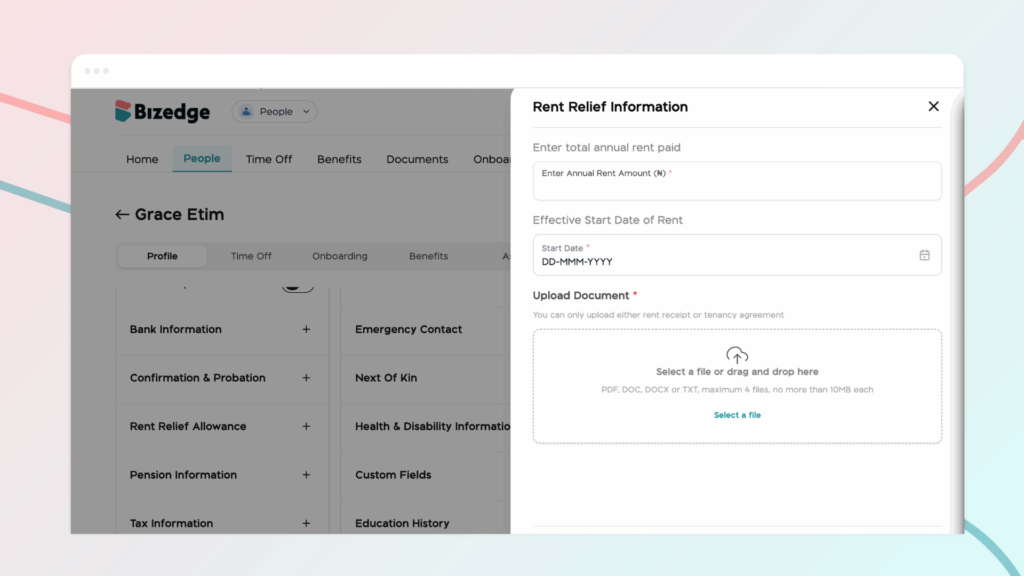
Step 4: After entering the required details, proceed to upload the supporting document. These documents serve as proof of the information provided in the system.Step 5: Finally, carefully review all the information entered to ensure accuracy and completeness. Once confirmed, click Save to apply the updates. This ensures that the employee’s rent relief information is properly recorded and maintained within the system.



