
How to Bulk Update Compensation
How to Set up and Manage Time-off Policies
Step 1: To review and process an employee’s profile update request, navigate to the People App. From there, open the employee’s profile to access their detailed information and any pending update requests submitted by the employee.
This request is typically generated when an employee updates or submits changes to their personal or employment information through the MyEdge app.
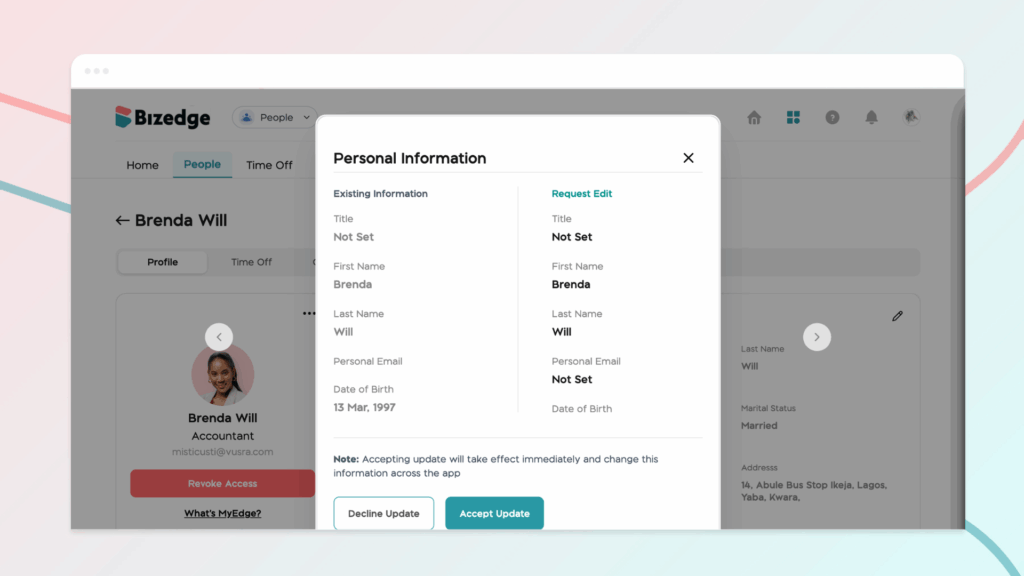
Step 2: Carefully compare the updated details with the existing records in the system. This step is important to ensure that the new information provided by the employee is correct, complete, and consistent with company records.
Step 3: After verifying the information, you can decide how to proceed by clicking Approve or decline
This ensures that the update request is either approved or declined and the employee’s profile remains accurate and properly maintained within the system



